
If you’re feeling unsure whether your resume will pass an ATS scan, you’re not alone. The concern is real—and justified. Roughly 98% of Fortune 500 companies and up to 45% of smaller businesses now use Applicant Tracking Systems (ATS) to manage job applications. And yet, despite all the hype, most of the fear around ATS boils down to one thing: confusion.
Let’s clarify something upfront. The myth that ATS software is automatically rejecting huge swaths of resumes before a human ever sees them? Not exactly accurate.
The real issue isn’t automatic rejection—it’s invisibility. If your resume doesn’t parse properly, it might as well not exist. And that’s a problem, even if you’re highly qualified for the job.
With over 30 years of experience writing resumes that work for both humans and machines, I’ve seen it all. I’ve also developed resume templates that don’t just look great—they’re designed using proven resume structure and formatting that consistently parse cleanly in ATS systems.
In this post, I’ll walk you through:
- The difference between parsing and keyword matching (they’re not the same!)
- 5 persistent but outdated pieces of ATS advice that need to go
- A free, fast way to test your resume for parsing issues
- What to do if your resume fails the test
Let’s break this down.
Resume Parsing for ATS vs. Resume Keyword Matching: Know the Difference
This is where so many job seekers get tripped up, and understandably so—it’s confusing.
Let’s start with ATS parsing. Parsing is the very first step an ATS takes after your resume is uploaded. The system scans your file and tries to break it down into structured, labeled data points: job titles, employer names, start and end dates, degrees, certifications, and so on. It’s like taking a picture of your resume and trying to turn it into a database record.
If something in your resume layout or formatting prevents that text from being accurately extracted and categorized, the parsing fails. This means even if your resume contains all the right experience, the ATS might misplace or entirely miss that information—leaving you out of consideration.
Now let’s talk about keyword matching. This step happens after parsing. The ATS searches the parsed text for specific keywords and phrases from the job description. It’s looking for matches in hard skills, soft skills, job titles, and industry-specific language. This helps recruiters filter large volumes of applicants based on relevance.
So here’s the bottom line: If your resume doesn’t parse correctly, keyword matching won’t matter.
You could have the perfect mix of experience and skills, but if the ATS can’t extract that information properly, it won’t register in the system.
Here’s a simple analogy:
If the text isn’t parsed correctly, it’s like running a search on a blank page.
Why Jobscan and Similar ATS Tools Only Solve Half the Problem
Many job seekers turn to tools like Jobscan, ResumeWorded, or SkillSyncer for “ATS checks,” but these primarily evaluate resume-to-job-description keyword matching rather than ATS parsing.
In other words, these tools compare your resume to a specific job description and calculate a match rate based on the presence (or absence) of key hard skills, soft skills, job titles, and buzzwords. They are designed to provide guidance on how to better align your resume’s language with the job posting—making your resume more searchable once it’s in the ATS.
But—and this is critical—they operate under the assumption that your resume has already been correctly parsed.
Parsing comes first. If the ATS can’t extract your information into the right categories, keyword optimization won’t help. You could have a 90% keyword match score from one of these tools, but if your job titles are jumbled or your dates aren’t recognized, your resume might not even surface in a recruiter’s search.
These tools can also miss layout-based red flags: for example, text placed in graphics or non-standard columns that parsing engines can’t read correctly. They might mention general formatting tips, but they don’t simulate the actual data extraction step that determines whether your resume content is even usable by the system.
That’s why the plain text test—described below—is a vital complement to keyword optimization tools. It lets you see for yourself whether your resume’s content is actually extractable and in the correct order, giving you a more complete picture of how it performs in an ATS.
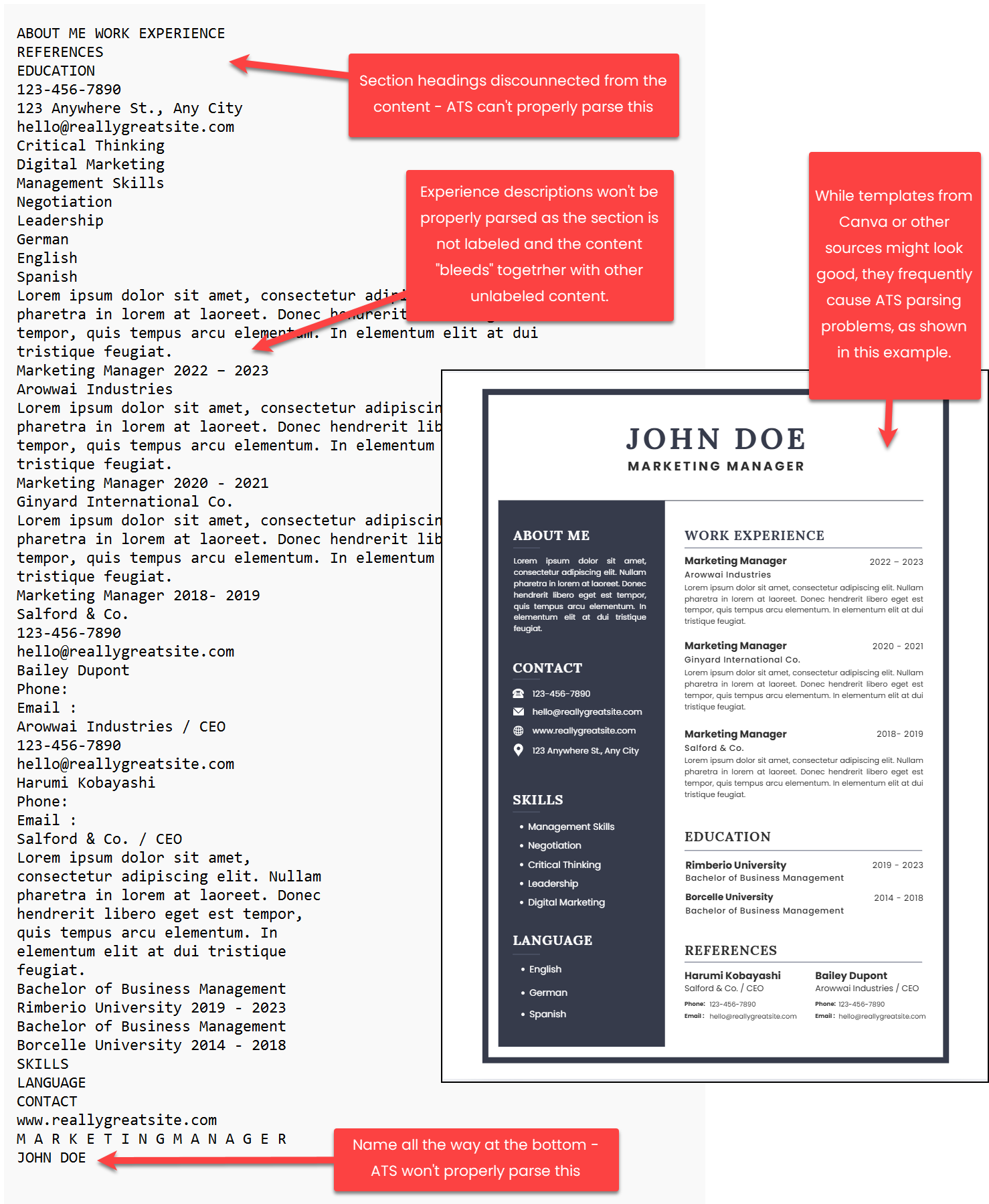
Why Canva Resume Templates and Similar Tools Can Sabotage Your ATS Parsing
Many job seekers use popular design tools like Canva, believing that saving their resume as a PDF guarantees ATS compatibility. This is a dangerous misconception. While PDFs can be ATS-friendly, resumes created in Canva or similar graphic design platforms often fail parsing for two reasons:
1. Complex Layouts Cause Jumbled Parsing:
Canva resume templates often use multi-column layouts, intricate designs, or overlapping elements to look visually appealing. These can confuse ATS, which read text linearly (left to right, top to bottom). For example, a two-column resume might parse as a chaotic mix of job titles, dates, and skills, disrupting categorization into fields like “Work Experience” or “Education.” Even if the text is extractable, the jumbled output can make your resume unreadable in the ATS database.
2. Non-Searchable PDFs Act Like Images:
Not all PDFs are created equal. Some Canva exports (or those from other design tools) produce image-based PDFs rather than text-based, searchable ones. If you can’t select and copy text from your PDF (test with Ctrl+F), the ATS can’t read it either—it’s essentially a picture, leaving your resume blank in the system.
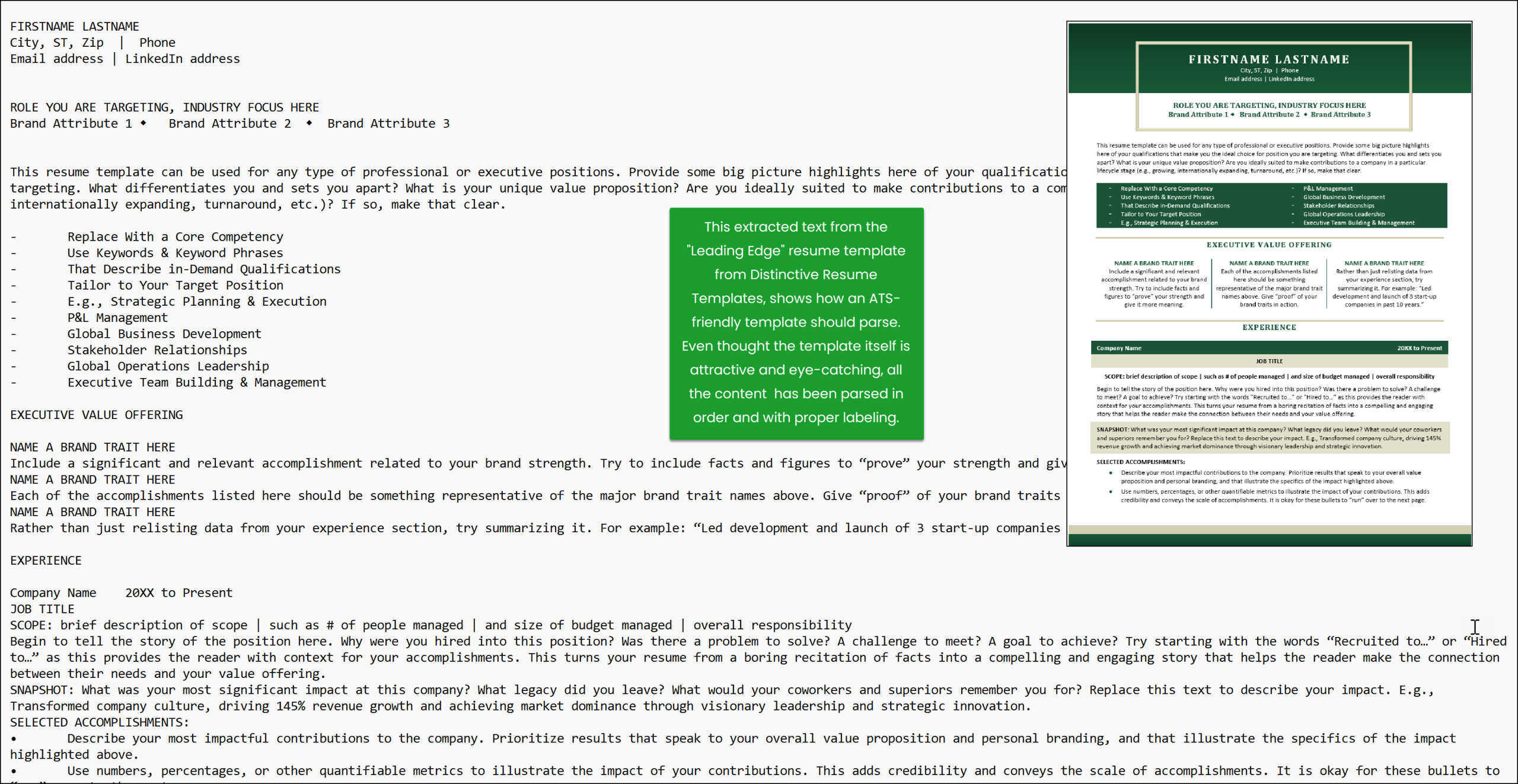
In contrast, resume templates built in Microsoft Word, like those from Distinctive Resume Templates, use simple, ATS-friendly structures optimized for .docx and searchable PDFs. These ensure clean text extraction and proper categorization, balancing visual appeal for humans with machine readability.
Debunking Common but Outdated ATS Advice
Misinformation about ATS parsing is rampant, even from some AI chatbots that draw their advice from online sources that are often outdated. With my decades of experience, I’ve seen firsthand what works and what doesn’t. Here are the top ATS myths—debunked with current facts:
The Plain Text Test: A Free, 5-Minute ATS Resume Parsing Check
The easiest way to check if your resume will parse correctly for an ATS is to convert it to plain text by copying and pasting into a text editor.
This mimics how ATS strip formatting to extract raw text, revealing issues like missing content (e.g., text in graphics) or jumbled sections (e.g., from columns or tables).
It’s free, takes 5 minutes, and requires no special software. Alternatively, you can save your resume as a .txt file, but copy-pasting is simpler and more closely matches how ATS select and extract text, ensuring you catch issues like non-searchable PDFs.
Check ATS Parsing: Step-by-Step Guide (Copy-Paste Method)
Alternative: Save As Text
You can also save your resume as a .txt file directly from Word (File > Save As > Plain Text). This extracts all text, including hidden elements like headers, but may format tables or lists slightly differently than an ATS. Copy-pasting is preferred because it shows exactly what’s selectable, which aligns with ATS parsing logic.
For PDF Resumes
If your resume is a PDF:
What to Look For
Pro Tip: All Distinctive Resume Templates are designed with parsing logic in mind, informed by decades of experience and real-world ATS testing. They combine clean structure with high visual impact—so you don’t have to choose between ATS-friendly and eye-catching.
Limitations & Final ATS Resume Parsing Tips
The plain text test is powerful, but not perfect. ATS platforms like Workday or Taleo have quirks that may still affect field mapping.
Some job boards used to show parsing previews when uploading a resume. That’s less common now. So your best bet? Test it yourself.
Remember: A beautiful resume that doesn’t parse is like a billboard in the desert. No matter how brilliant it is, no one’s going to see it.
Conclusion: Take 5 Minutes to Avoid Weeks of Frustration
Your resume is your professional passport—and ATS parsing is the checkpoint. A five-minute test today could be the reason you get seen tomorrow.
Want a shortcut? Try one of our tested, ATS-friendly templates from Distinctive Resume Templates. They’re designed to pass the parsing test with flying colors.
Your next opportunity could be one upload away. Let’s make sure your resume gets there.
FAQs: Common Questions About ATS Resume Parsing
What is ATS parsing, and why is it important?
ATS parsing is when an Applicant Tracking System extracts text from your resume and organizes it into fields like job titles or skills. If parsing fails, your resume may be misfiled or invisible to recruiters, even with perfect keywords. Testing parsing ensures your qualifications are seen.
How is parsing different from keyword matching?
Parsing is the technical process of extracting and categorizing text; keyword matching checks if that text aligns with a job description. Parsing comes first—if it fails, keywords won’t matter. Tools like Jobscan focus on keywords, but the plain text test in this article checks parsing directly.
Will using Canva for my resume ruin ATS parsing?
Not necessarily, but Canva’s complex layouts (e.g., multi-columns) can jumble text, and some PDFs may be image-based, not searchable. Use Microsoft Word-based templates, like those from Distinctive Resume Templates, for clean, ATS-friendly parsing.
Do I have to use specific fonts like Arial for ATS?
No, font choice doesn’t affect parsing in .docx or .txt files. For PDFs, ensure fonts are embedded. Standard fonts like Calibri are recommended for human readability across systems, not for ATS parsing.
Can graphics make my resume ATS-unfriendly?
Graphics are fine if they don’t contain critical text (e.g., your name or skills). ATS ignore graphics, but text in images won’t parse. Keep essential content in plain text, as in Distinctive Resume Templates.
How do I know if my PDF is searchable for ATS?
Open your PDF in Adobe Reader, press Ctrl+F, and search for a word. If it’s not selectable, it’s an image-based PDF and won’t parse. Recreate it using Word’s “Save as PDF” for a searchable file.
Why does my resume look jumbled in the plain text test?
Jumbled text often comes from complex layouts like columns or tables. Simplify to a single-column format with standard headings (e.g., “Work Experience”) to ensure ATS categorize your data correctly.
What if my resume fails the plain text test?
Remove text from graphics, simplify layouts, and use standard headings. For improved results, try Distinctive Resume Templates, designed with 30 years of expertise to parse perfectly while looking professional.
About the Author: Michelle Dumas